 Login/Register


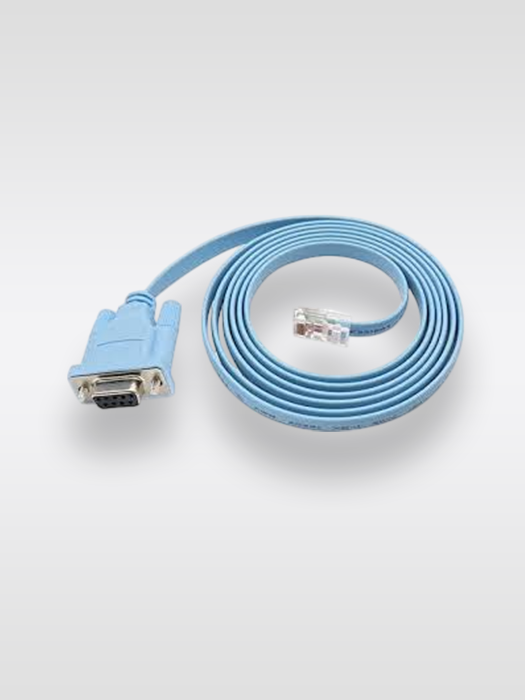
Cisco Console Cable DB9 RJ45 to DB9
The Cisco Console Cable DB9 is an RJ45-to-DB9 serial console cable designed for connecting compatible Cisco routers, switches and network appliances to a computer or terminal. Therefore, it is a useful accessory for network configuration, troubleshooting and device management.
Condition: Used and 100% Tested
Product Warranty: 90 Days and
Shipping: Free Shipping Within UAE
Call / WhatsApp: +971 50 448 2167 / +971 52 643 0223
Product Description
The Cisco RJ45 to DB9 Console Cable provides a convenient serial connection between compatible Cisco console ports and computers equipped with a DB9 serial interface. Cisco documentation describes RJ45-to-DB9 console connections as a standard method for connecting Cisco networking equipment to a PC or terminal.
Furthermore, the cable is particularly useful for network engineers who need direct console access during installation or troubleshooting. Instead of relying on network connectivity, administrators can use a terminal-emulation application to access the device’s command-line interface.
In addition, Cisco documentation identifies 72-3383-01 as an RJ45-to-DB9 female console cable used with compatible Cisco equipment. Cisco documentation also describes this cable as approximately 6 feet long.
However, Cisco uses different console interfaces across its product families. Therefore, customers should verify the exact console port and required cable before ordering.
Key Features
- Cisco-compatible RJ45 to DB9 console connection
- Designed for compatible Cisco network equipment
- Useful for router and switch console access
- Suitable for network configuration and troubleshooting
- Supports serial terminal communication
- Convenient for IT administrators and network engineers
- Useful as a replacement or spare console cable
- Suitable for server rooms, network cabinets and data centers
Moreover, keeping a console cable available can help technicians access network equipment when remote management is unavailable.
Technical Specifications
| Specification | Details |
|---|---|
| Product Type | Cisco Console Cable |
| Cable Type | RJ45 to DB9 |
| Console Interface | RJ45 |
| Computer Interface | DB9 Serial |
| Application | Network Device Console Access |
| Primary Use | Configuration / Troubleshooting |
| Cable Family | Cisco Serial Console Cable |
| Cisco Part Number | 72-3383-01* |
| Approximate Length | 6 ft / 1.8 m* |
| Connector Type | RJ45 to DB9 Female* |
*Confirm these details against your physical stock before publishing if your product is not specifically Cisco 72-3383-01.
How Cisco DB9 Console Cable Works
First, connect the RJ45 end of the console cable to the compatible console port on the Cisco device.
Next, connect the DB9 end to a computer or terminal with a compatible serial port. Cisco documentation shows RJ45-to-DB9 console connections being used to connect Cisco equipment to a PC for terminal access.
Finally, open suitable terminal-emulation software and select the correct serial/COM port. The required console settings depend on the Cisco device, although many Cisco console connections use 9600 baud, 8 data bits, no parity and 1 stop bit.
Compatible Applications
The Cisco DB9 console cable can be useful for:
Cisco Switch Configuration
Network administrators can use the console connection for initial configuration, troubleshooting and recovery.
Cisco Router Management
Similarly, compatible Cisco routers can be accessed through their console interface for CLI-based configuration.
Network Troubleshooting
Furthermore, console access is useful when a device cannot be reached through the network. Therefore, a console cable is an important tool for many network technicians.
IT Maintenance
Finally, the cable can be kept as a spare accessory for network maintenance and equipment installation.
Cisco Console Cable vs USB Console Cable
These cables should not be confused.
The Cisco RJ45-to-DB9 console cable is designed for equipment with a compatible RJ45 console interface and a DB9 serial connection on the computer side.
In contrast, newer Cisco equipment may provide a dedicated USB console port. For example, Cisco documentation for newer switches describes USB Type-A-to-Mini-B console cables for USB console connections.
Therefore, always check the console interface on your Cisco device before purchasing.
Cisco Console Cable DB9 Compatibility
Cisco has used several console connection configurations across different product families. Consequently, compatibility should be confirmed using the exact switch, router or appliance model.
Cisco documentation specifically shows RJ45-to-DB9 connections for compatible Cisco console ports.
For example, Cisco documentation identifies the 72-3383-01 cable as an RJ45-to-DB9 console cable used with compatible equipment.
Why Choose Cisco Console Cable DB9?
The Cisco DB9 console cable is a simple and practical networking accessory.
First, it provides direct console connectivity. Additionally, it can be useful when a network device cannot be accessed through Ethernet.
Furthermore, the cable is easy to keep in an IT toolkit or server-room accessory kit. As a result, technicians can quickly establish local console access when required.
FAQs
1. What is a Cisco DB9 console cable?
A Cisco DB9 console cable is used to connect a compatible Cisco RJ45 console port to a computer or terminal through a DB9 serial connection.
2. What is Cisco part number 72-3383-01?
Cisco documentation identifies 72-3383-01 as an RJ45-to-DB9 console cable used with compatible Cisco equipment.
3. What is the Cisco DB9 console cable used for?
It is primarily used for initial configuration, CLI access, troubleshooting and recovery of compatible Cisco networking equipment.
4. Can I use this cable with Cisco switches?
Yes, provided the switch has a compatible RJ45 console interface and the cable's pinout matches the required Cisco console connection. Cisco documents RJ45-to-DB9 console connections for compatible Catalyst equipment.
5. Is Cisco DB9 console cable the same as a USB console cable?
No. A DB9 console cable uses a serial DB9 connection, whereas a USB console cable connects to a USB console interface. Therefore, check the console port on your Cisco device before ordering.
6. Can I use a USB-to-DB9 adapter with this cable?
Yes, if your computer does not have a native DB9 serial port, you can use a compatible USB-to-serial adapter. Cisco also notes that some modern laptops and PCs may require a USB-to-serial adapter for DB9 connections.
7. What terminal settings should I use?
The settings depend on the Cisco device. However, many Cisco console connections use 9600 baud, 8 data bits, no parity and 1 stop bit.


Reviews
There are no reviews yet.