 Login/Register


How to Reset Cisco Access Points AIR-AP3602I, AIR-AP3702I, AIR-AP2802I & AIR-AP3802I to Factory DefaultsCisco Aironet access points are widely used in offices, warehouses, hotels, schools and enterprise networks. If you have purchased a used Cisco AP, forgotten its previous configuration, are moving it to another wireless controller, or simply need to troubleshoot it, performing a factory reset is often the best place to start.
In this guide, we explain how to reset these popular Cisco Aironet models:
- Cisco Aironet AIR-AP3602I / AIR-CAP3602I
- Cisco Aironet AIR-AP3702I / AIR-CAP3702I
- Cisco Aironet AIR-AP2802I
- Cisco Aironet AIR-AP3802I
The easiest method is normally the physical MODE button, although the exact software behavior can depend on the AP model, installed software image and whether the unit is controller-based or running an autonomous image.
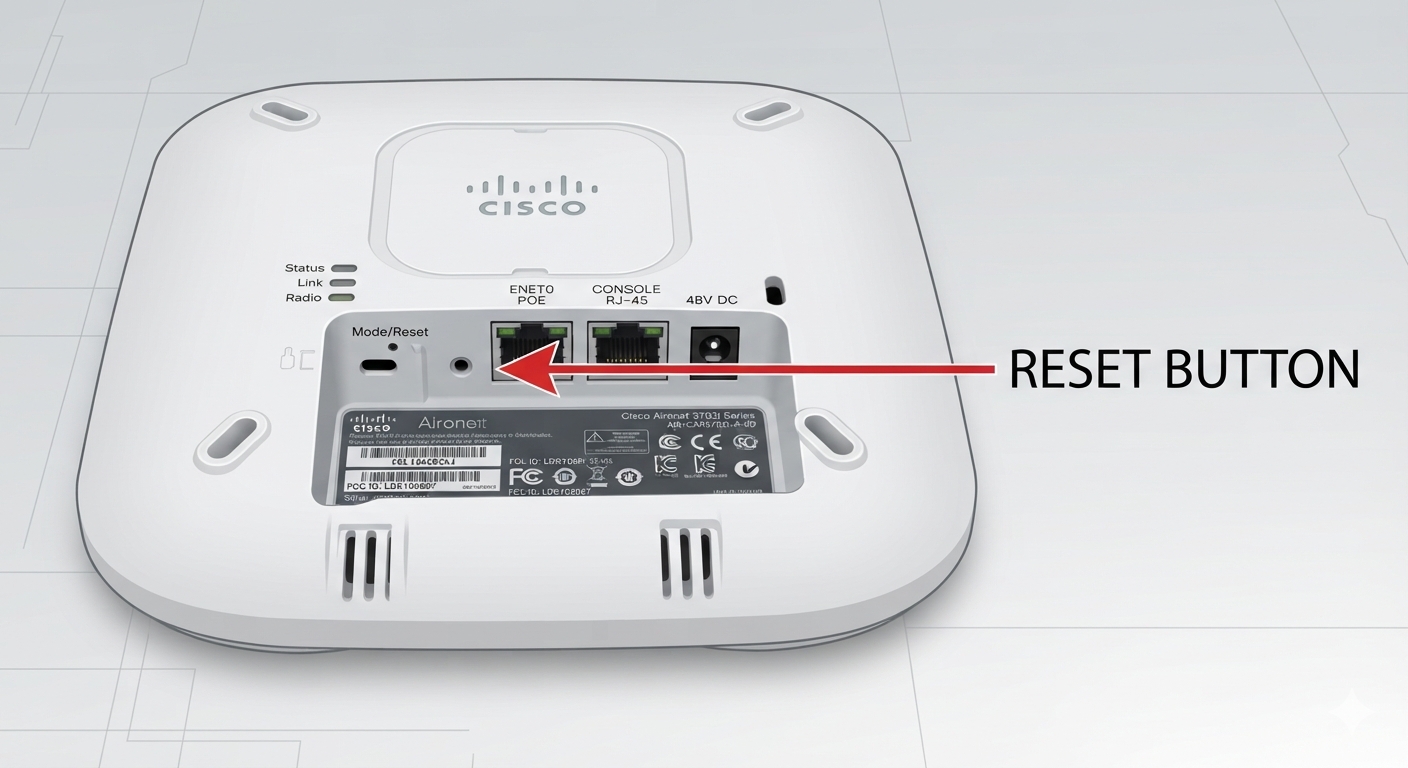
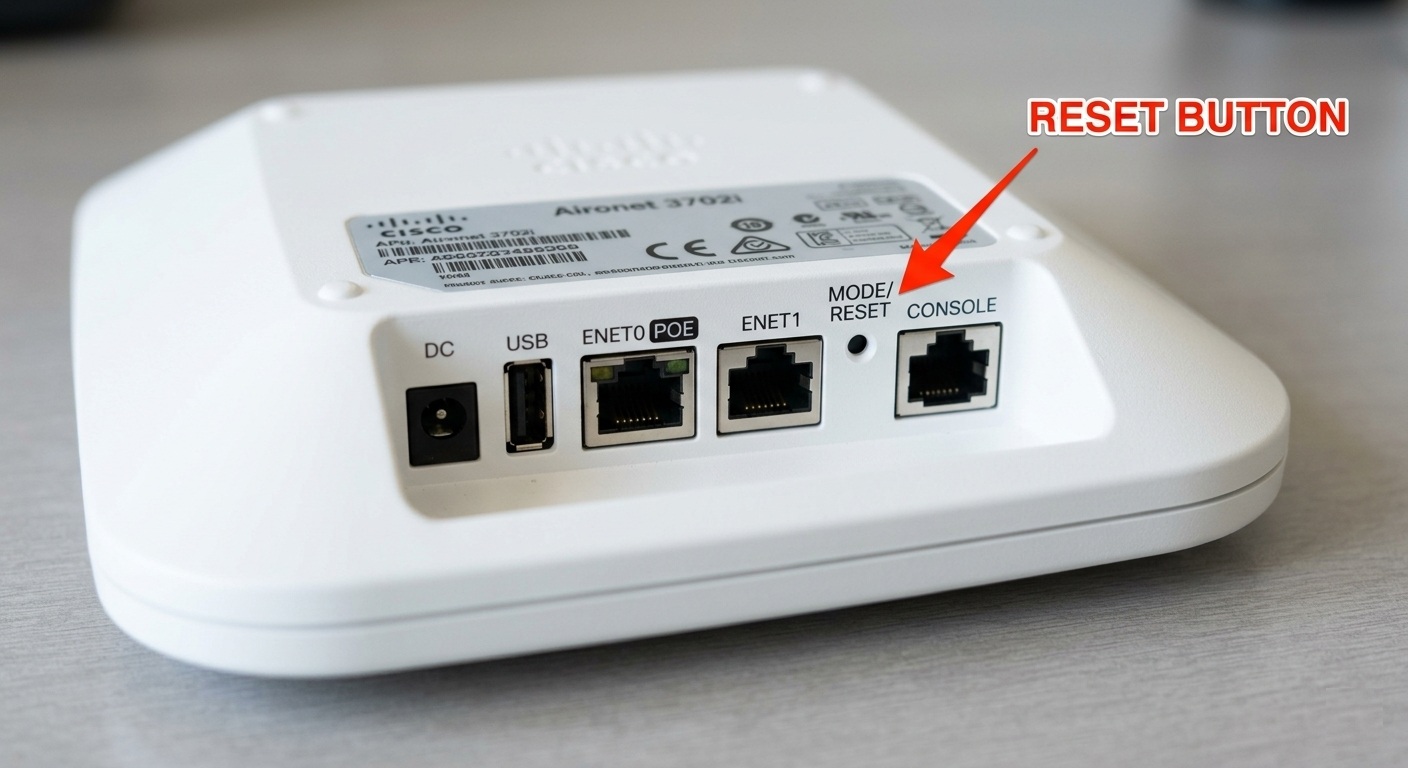
Why Would You Need to Reset a Cisco Access Point?
A factory reset removes the AP’s previous configuration so you can start again with a clean device.
You may need to reset your Cisco access point when you’ve forgotten its configuration or credentials, bought a used or refurbished AP, moved the AP to a different network, need it to discover a different Wireless LAN Controller (WLC), have configuration-related connectivity problems, or simply want to prepare the unit for resale or redeployment.
Important: A factory reset can remove saved network settings such as the IP address, SSID, passwords and other configuration data. Cisco specifically states this for the 2800 and 3800 series MODE-button reset procedure.
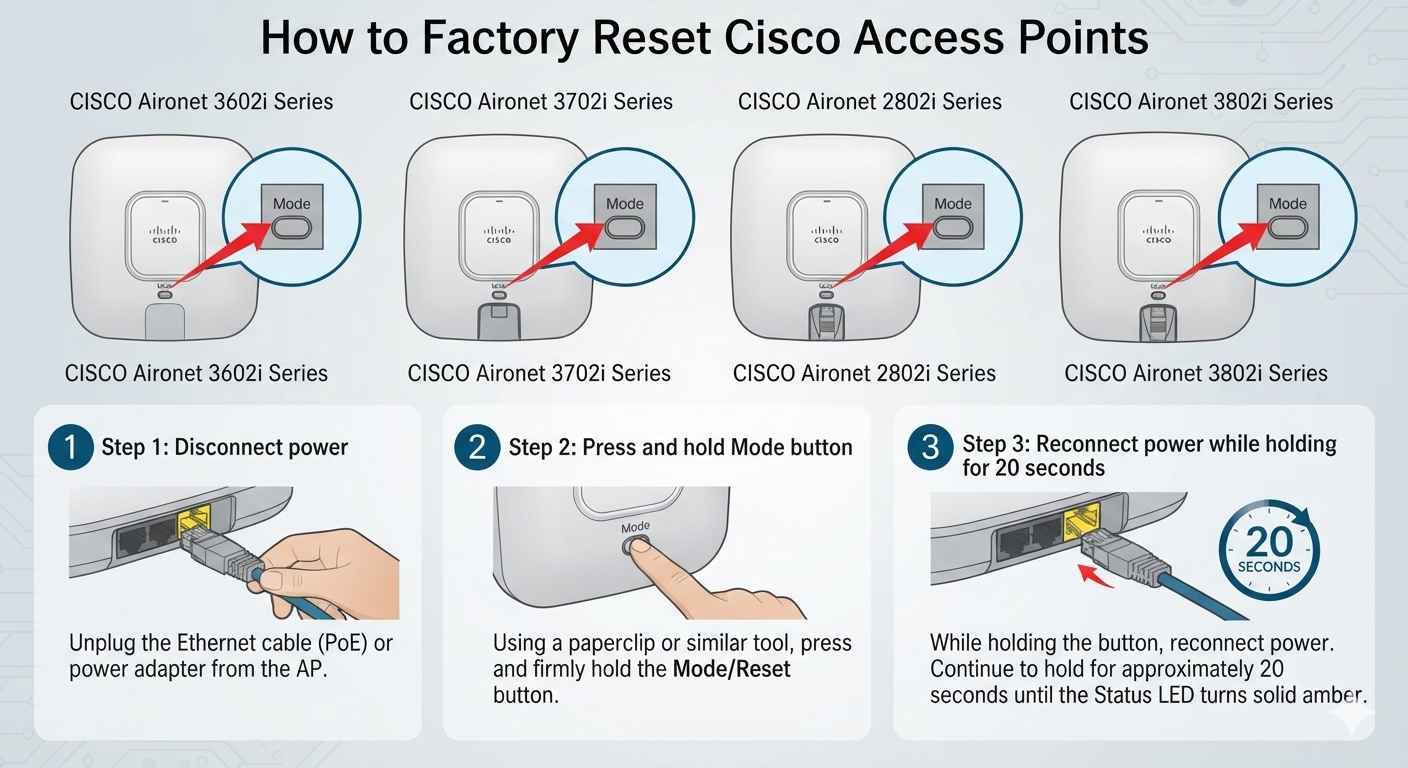
Method 1: Factory Reset Using the MODE Button
For most users, the physical MODE button is the simplest reset method because you don’t need to know the existing username, password or IP address.
Step 1 — Disconnect Power
Turn off the access point by disconnecting its power source.
If your AP is powered by PoE (Power over Ethernet), unplug the Ethernet cable supplying power.
If you are using an external power adapter, disconnect the adapter.
Step 2 — Locate the MODE Button
Find the MODE button on your Cisco Aironet access point.
On some models it is recessed, so you may need a small pointed object to press it.
For example, the underside of the 3602 series places the MODE control close to the console and Ethernet connections.
Recommended image for NetworkServer.ae: Take your own close-up photo of the underside of an AIR-CAP3602I or AIR-CAP3702I and add a simple arrow reading “MODE Button”. An original image is preferable for your article.
Step 3 — Hold the MODE Button
Press and continue holding the MODE button.
While holding it, reconnect the Ethernet/PoE cable or other power source.
The access point will begin its boot process.
Step 4 — Watch the Status LED
Continue holding the MODE button while the AP boots.
For the Aironet 2800 and 3800 series, Cisco’s documentation says to wait until the status LED changes to amber. For a normal factory-default reset, the MODE button should be held for less than 20 seconds. Cisco
Then release the MODE button.
Step 5 — Allow the AP to Reboot
Don’t disconnect power immediately after releasing the button.
Allow the access point to complete its boot process. After the reset, it will no longer have the previous network configuration and may attempt to discover a compatible Cisco wireless controller, depending on the software installed.
Resetting Cisco AIR-AP3602I
The Cisco Aironet 3602I belongs to the older Aironet 3600 family.
For a physical reset:
Disconnect power → press and hold MODE → reconnect power while holding MODE → monitor the LED → release the button at the appropriate reset point → allow the AP to reboot.
The 3602I may be encountered with different software/configuration arrangements, so don’t assume every second-hand 3602I will behave identically after reset.
Cisco’s documentation for universal APs also lists the AP3602I among supported models and documents both hardware and software reset mechanisms. Cisco
Resetting Cisco AIR-AP3702I
The same basic MODE-button process applies to the Cisco Aironet 3702I.
- Disconnect the AP from PoE/power.
- Press and hold the MODE button.
- Restore power while continuing to hold MODE.
- Monitor the AP’s LED/console output.
- Release MODE at the appropriate reset stage.
- Wait for the access point to reboot.
Cisco documentation covering universal APs specifically includes the AP3702I, while Cisco Community guidance for factory-resetting an AIR-CAP3702I also describes the power-off, MODE-button and power-on procedure. Cisco
NetworkServer.ae also carries information about the Cisco AIR-CAP3702I, an 802.11ac enterprise AP with integrated antennas. Network Server
Internal link to add here: Link the text “Cisco AIR-CAP3702I Access Point” to your existing 3702I product page.
Resetting Cisco AIR-AP2802I
For the AIR-AP2802I, Cisco provides particularly clear MODE-button instructions.
Disconnect power, hold down the MODE button and reconnect power while keeping the button pressed. Wait for the status LED to turn amber.
For a standard factory-default reset, Cisco says to keep MODE pressed for less than 20 seconds. This clears configuration settings including passwords, IP address and SSID. Cisco
Be careful with the button timing
There is an important distinction on the 2800 series.
Holding MODE for less than 20 seconds performs the normal factory-default reset. Holding it for more than 20 but less than 60 seconds clears the AP’s internal storage, including configuration files. Cisco also says holding the button for more than 60 seconds is treated as a faulty button and no changes are made. Cisco
So don’t simply tell technicians to “hold the reset button for one minute.”
Resetting Cisco AIR-AP3802I
The AIR-AP3802I uses a very similar procedure.
Disconnect the AP’s power, hold the MODE button, restore power and continue holding MODE during boot.
When the LED changes to amber, release MODE within the normal factory-reset window.
Cisco’s official 3800 Series guide states that keeping MODE pressed for less than 20 seconds clears the configuration and restores factory-default settings, including passwords, IP information and SSID configuration. Cisco
As with the 2802I, don’t confuse a standard factory reset with the longer MODE-button operation that clears internal storage.
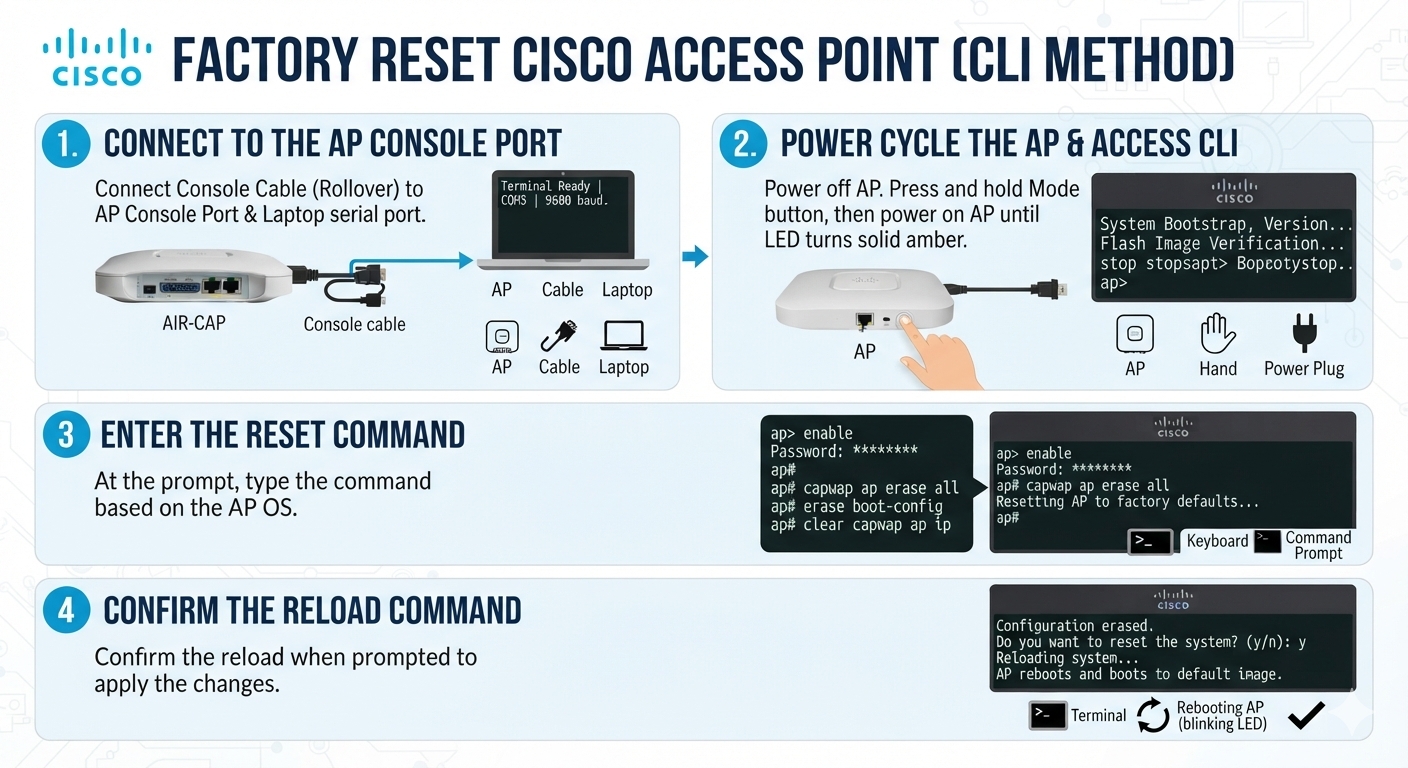
Cisco AP Reset Using the CLI
If you already have console/CLI access, certain Cisco Aironet configurations can also be reset through software instead of using the physical MODE button.
For an autonomous AP, Cisco documents commands including:
enable
erase nvram
write default-config
reload
Confirm the prompts when requested.
Cisco’s Aironet Universal AP documentation describes this autonomous AP procedure, including erase nvram, write default-config and reload. Cisco
Do not blindly use commands from one AP generation on another. Cisco’s newer AP platforms and controller-based deployments can use different commands and reset mechanisms. Identify the model and software image first.
Resetting an AP from a Cisco Wireless LAN Controller
If the AP is already joined to a Cisco Wireless LAN Controller, you may not need physical access to reset its configuration.
For supported deployments, Cisco documents the controller CLI command:
clear ap config <Cisco-AP-name>Cisco also documents a GUI route through the WLC’s access-point configuration to clear an AP’s configuration. Cisco
This can be useful when you’re managing multiple Cisco access points remotely.
What Happens After You Reset the Cisco AP?
A common mistake is expecting a reset Cisco enterprise AP to behave like a home Wi-Fi router.
Many Cisco Aironet units are designed to operate with a Cisco Wireless LAN Controller. Resetting the AP does not automatically convert a controller-based AP into a standalone access point.
Depending on its software, configuration and model, a reset AP may boot and begin looking for a compatible wireless controller.
This distinction is particularly important when buying used Cisco Aironet hardware.
AP Not Working After Factory Reset?
If your AIR-AP3602I, AIR-AP3702I, AIR-AP2802I or AIR-AP3802I doesn’t come online after resetting, don’t immediately assume that the hardware is faulty.
First check the PoE power, Ethernet connection and LED behavior. Then determine whether the AP is trying to discover a WLC. If necessary, connect a console cable and monitor the boot messages.
Controller compatibility and installed software also matter. Cisco specifically advises checking that the wireless controller is running software compatible with the access point. Cisco
Frequently Asked Questions
How do I factory reset a Cisco AIR-AP3802I?
Disconnect power, press and hold the MODE button, reconnect power while keeping MODE pressed, and monitor the status LED. Cisco says that during boot, once the LED reaches amber, keeping MODE pressed for less than 20 seconds performs the factory-default reset. Cisco
How do I reset a Cisco AIR-AP2802I?
Use the MODE button during the boot cycle. For the standard factory-default operation, Cisco specifies holding MODE for less than 20 seconds after the relevant boot indication. Cisco
Does factory reset delete the IP address?
For the documented 2800/3800 factory reset, Cisco says the process resets settings including the IP address, passwords and SSID. Cisco
Can I reset a Cisco access point without a password?
Yes. If you have physical access to a supported Aironet AP, the MODE-button procedure can reset it without logging into its existing configuration.
Will factory reset make my Cisco AP standalone?
No. A factory reset and conversion between controller-based and standalone operation are different processes.
Why is my Cisco AP searching for a controller after reset?
The AP may have a controller-based image/configuration and therefore attempts to discover and join a compatible Cisco Wireless LAN Controller after booting.
Need Cisco Access Points in the UAE?
NetworkServer.ae supplies enterprise servers, networking equipment and related IT hardware to customers in the UAE, and the website currently lists the Cisco AIR-CAP3702I. Network Server
For Cisco access points, switches, networking equipment or refurbished enterprise IT hardware, contact NetworkServer.ae to check current availability.
 Share
Share