 Login/Register


How to Configure Translation Patterns on CUCM
Translation Patterns on CUCM are used to manipulate dialed digits before a call is routed to its destination. Cisco Unified Communications Manager (CUCM) translation patterns are especially useful when you need to modify phone numbers, add or remove digits, or route calls according to a specific dial plan.
This guide explains how to configure Translation Patterns on CUCM, including how to create a translation pattern, configure digit manipulation, select a calling search space, and test the resulting call routing.
What Is a Translation Pattern in CUCM?
A Translation Pattern in CUCM matches the digits dialed by a user and translates those digits into another number before call routing continues.
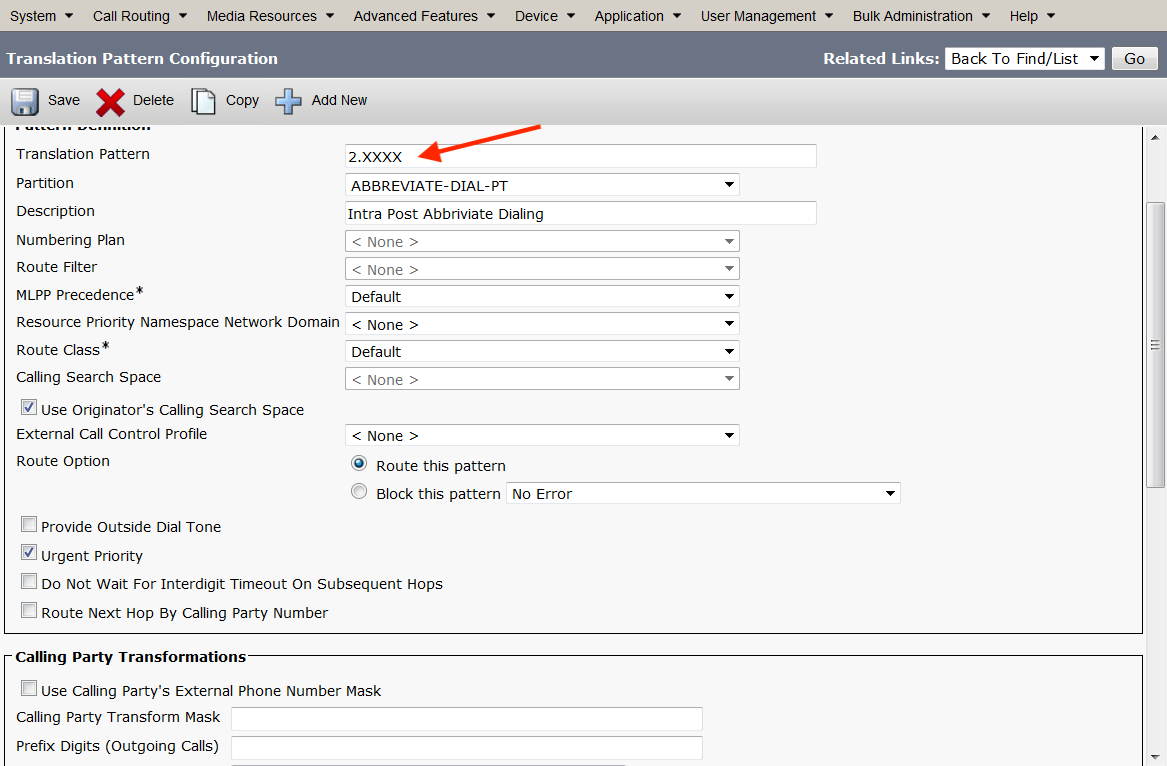
Translation patterns, in the following example a sets DN is 87032000, but 22000 also works due to a translation pattern.
Take 2.xxxx, delete left of the dot, and add a prefix of 8703. The dialed number 22000 will ring DN 87032000.
- Enter the Translation Pattern, eg: 2.XXXX
- Scroll down to Called Party Transformations, Discard PreDot (the 2) and add prefix 8703
- Click SAVE and test

What Is a Translation Pattern in CUCM?
A Translation Pattern in CUCM matches the digits dialed by a user and translates those digits into another number before call routing continues.
For example, a user may dial:
9 + 0501234567The translation pattern can remove the initial 9 and send:
0501234567to the appropriate route.
Translation patterns can therefore simplify complex CUCM dial plans.
When Should You Use a CUCM Translation Pattern?
Translation patterns are commonly used for:
- Removing access codes
- Adding prefixes
- Modifying dialed numbers
- Routing calls to external numbers
- Converting internal numbers
- Normalizing telephone numbers
- Sending calls to specific route patterns
- Implementing specialized dialing rules
How to Configure Translation Patterns on CUCM
Follow these steps to configure a translation pattern in CUCM.
Step 1: Log In to CUCM Administration
Open Cisco Unified Communications Manager Administration.
Log in using an account with the required administrative permissions.
Step 2: Open Translation Pattern Configuration
Navigate to:
Call Routing → Translation Pattern
Then select:
Add New
The Translation Pattern configuration page will open.
Step 3: Enter the Translation Pattern
Enter the number pattern that CUCM should match.
For example:
9.XXXXXXXXXXThe exact pattern depends on your dial plan and the number format used in your environment.
For example, if users dial:
9 0501234567the translation pattern can be designed to recognize the access code and the following digits.
The exact wildcard and digit pattern should match your organization’s numbering plan.
Step 4: Select the Partition
Select the appropriate Partition.
For example:
PT-TranslationPartitions determine which calling search spaces can access the translation pattern.
If the appropriate partition does not exist, create it under:
Call Routing → Class of Control → Partition
Step 5: Configure Called Party Transformations
The Called Party Transformations section controls how CUCM modifies the number after the translation pattern matches.
Common options include:
- Discard Digits
- Prefix Digits
- Calling Party Transformation Mask
- Called Party Transformation Mask
For example, if the user dials:
90501234567and the first digit is an access code, you may configure CUCM to discard the leading 9.
The resulting number becomes:
0501234567Step 6: Configure the Calling Search Space
Select the appropriate Calling Search Space (CSS).
The CSS determines which partitions and destinations the translated call can access.
For example:
CSS-ExternalMake sure the selected CSS has access to the required route patterns, route lists, gateways, or other destinations.
Step 7: Configure Route Option
Depending on your CUCM version and design, configure the appropriate routing behavior.
Translation patterns can be used to transform a number and then continue call processing through the CUCM dial plan.
Review options such as:
- Route Option
- Route Next Hop By Calling Party Number
- Provide Outside Dial Tone
- Urgent Priority
Use these options according to your specific dial-plan requirements.
Step 8: Configure Urgent Priority if Required
The Urgent Priority option can be useful when CUCM should immediately process a matching pattern without waiting for additional digits.
Use this option carefully.
Incorrect urgent-priority settings can cause CUCM to route calls before the user has finished dialing.
Step 9: Configure the Transformation
Suppose users dial:
9 + 0501234567You want CUCM to remove the access code 9.
The translation pattern can match the complete dialed number and use digit manipulation to produce:
0501234567The transformed number can then continue through the CUCM routing process.
Step 10: Save the Translation Pattern
After configuring the required settings, click:
Save
CUCM will create the translation pattern.
Example CUCM Translation Pattern
Consider this example:
User dialing:
9 0501234567Translation Pattern:
9.XXXXXXXXXXDigit manipulation:
Remove leading 9Translated number:
0501234567The resulting number can then be routed using the appropriate CUCM route pattern, route list, or gateway configuration.
A translation pattern primarily performs digit manipulation and can change the number before CUCM continues call processing.
Route Pattern
A route pattern is primarily used to select the appropriate route, such as a route list or gateway.
For example:
Translation Pattern
        ↓
Modify Number
        ↓
Route Pattern
        ↓
Route List
        ↓
Gateway
        ↓
PSTN
The exact call-routing sequence depends on the CUCM dial-plan design.
Translation Pattern and Calling Search Space
Calling Search Spaces are extremely important when configuring translation patterns.
A translation pattern can exist in a partition, while the device or calling entity uses a CSS containing that partition.
For example:
Phone CSS
   ↓
PT-Translation
   ↓
Translation Pattern
After translation, the resulting number must also be able to reach the required destination according to the applicable CSS and partitions.
Common CUCM Translation Pattern Problems
Translation Pattern Does Not Match
Check:
- Dialed digits
- Wildcards
- Partition
- Calling Search Space
- Overlapping patterns
- Urgent priority
Call Is Rejected
Check whether the resulting number can access the required route pattern or gateway.
Wrong Number Is Sent to the Gateway
Review the called-party transformation settings.
Check whether CUCM is:
- Removing digits
- Adding digits
- Applying a transformation mask
- Using a different route pattern
User Cannot Access the Translation Pattern
Check the phone’s Calling Search Space.
The CSS must contain access to the partition where the translation pattern resides.
How to Test a CUCM Translation Pattern
After creating the translation pattern, place a test call using the exact digits that should match the pattern.
For example:
90501234567Verify:
- The translation pattern matches.
- The expected digits are removed or added.
- The resulting number is correct.
- CUCM selects the expected route.
- The call reaches the intended gateway or destination.
CUCM dial-plan troubleshooting tools such as Dialed Number Analyzer (DNA) can also help determine which pattern matches the dialed digits.
Best Practices for CUCM Translation Patterns
When creating translation patterns:
- Use clear partition names.
- Document the purpose of each pattern.
- Avoid unnecessary overlapping patterns.
- Carefully control Calling Search Spaces.
- Test digit manipulation before production deployment.
- Avoid overly broad patterns.
- Document prefixes and access codes.
- Use Dialed Number Analyzer when troubleshooting.
- Review the resulting number before sending calls to a gateway.
Frequently Asked Questions
What is a translation pattern in CUCM?
A translation pattern is a CUCM dial-plan rule that matches dialed digits and can modify the called number before call routing continues.
How do I configure a translation pattern in CUCM?
Go to Call Routing → Translation Pattern → Add New, enter the pattern, select the partition and calling search space, configure digit manipulation, and save the configuration.
What is the difference between a translation pattern and a route pattern?
A translation pattern is commonly used to manipulate or translate digits, while a route pattern is commonly used to determine where the call should be routed.
Can a translation pattern remove digits?
Yes. CUCM translation patterns can be configured to remove or modify digits using the available called-party transformation settings.
Why is my CUCM translation pattern not working?
Check the dialed number, pattern syntax, partition, Calling Search Space, digit manipulation settings, and overlapping patterns. CUCM Dialed Number Analyzer can help identify which pattern is matching.
Conclusion
Learning how to configure Translation Patterns on CUCM is important when building and troubleshooting a Cisco Unified Communications Manager dial plan. Translation patterns can simplify dialing by removing access codes, adding prefixes, modifying telephone numbers, and preparing numbers for further call routing.
Always test translation patterns carefully before deploying them in a production CUCM environment.
 Share
Share